

Your booking website answers while you're under the car
What a workshop booking website should do while you work: show real availability, take the right details, and put each booking straight into the diary.
In this post
A well-made workshop booking system gives new customers a clear way to book while you’re busy. It should show suitable availability, capture the right details and put the booking straight into your workshop diary. It should also make it easy for your team to step in when a job needs a proper conversation.
Your website is the front door
A new customer may find your garage through a search, a recommendation or a link from someone they trust. Before they call, they may want to know what you work on, where you are and whether they can book without waiting for you to answer.
That first impression matters. A website with a working booking route gives people a practical next step, even when the phone is out of reach and the workshop is noisy.
It won’t replace a good conversation. It can reduce the number of calls you need to stop work for, and make it easier for straightforward bookings to reach the diary.
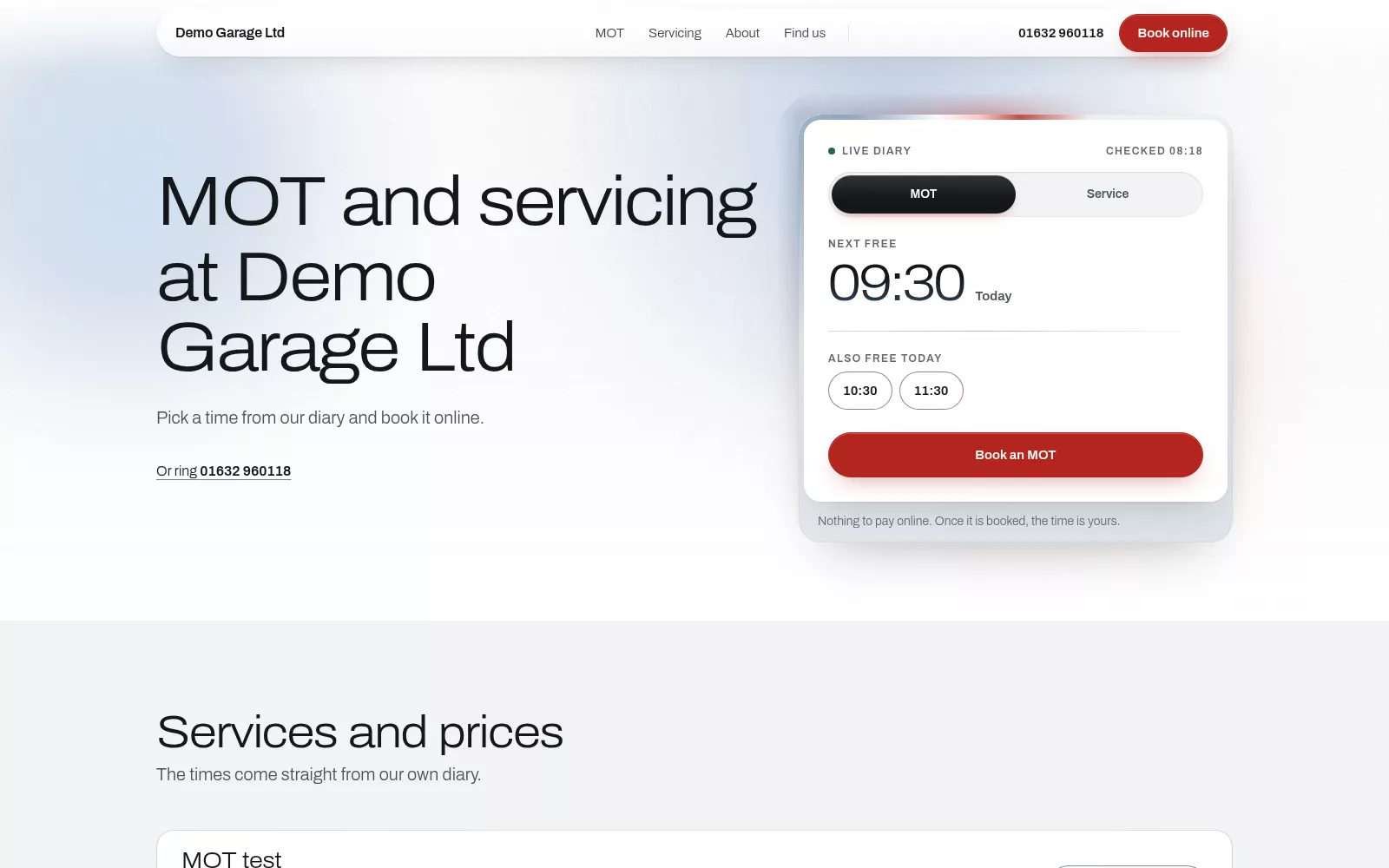
What should happen when a customer books?
The booking journey should be simple for the customer and useful for your team. A good system connects the website to the workshop diary instead of treating an online request as a message to be copied across later.
A typical journey looks like this:
- The customer chooses the work. They select a service or booking type that matches what your garage offers.
- They see suitable availability. The site shows the times that are free for that kind of work, not just an empty box for a preferred date.
- They enter their details. The form collects a name, contact details, vehicle registration and a clear description of what they need.
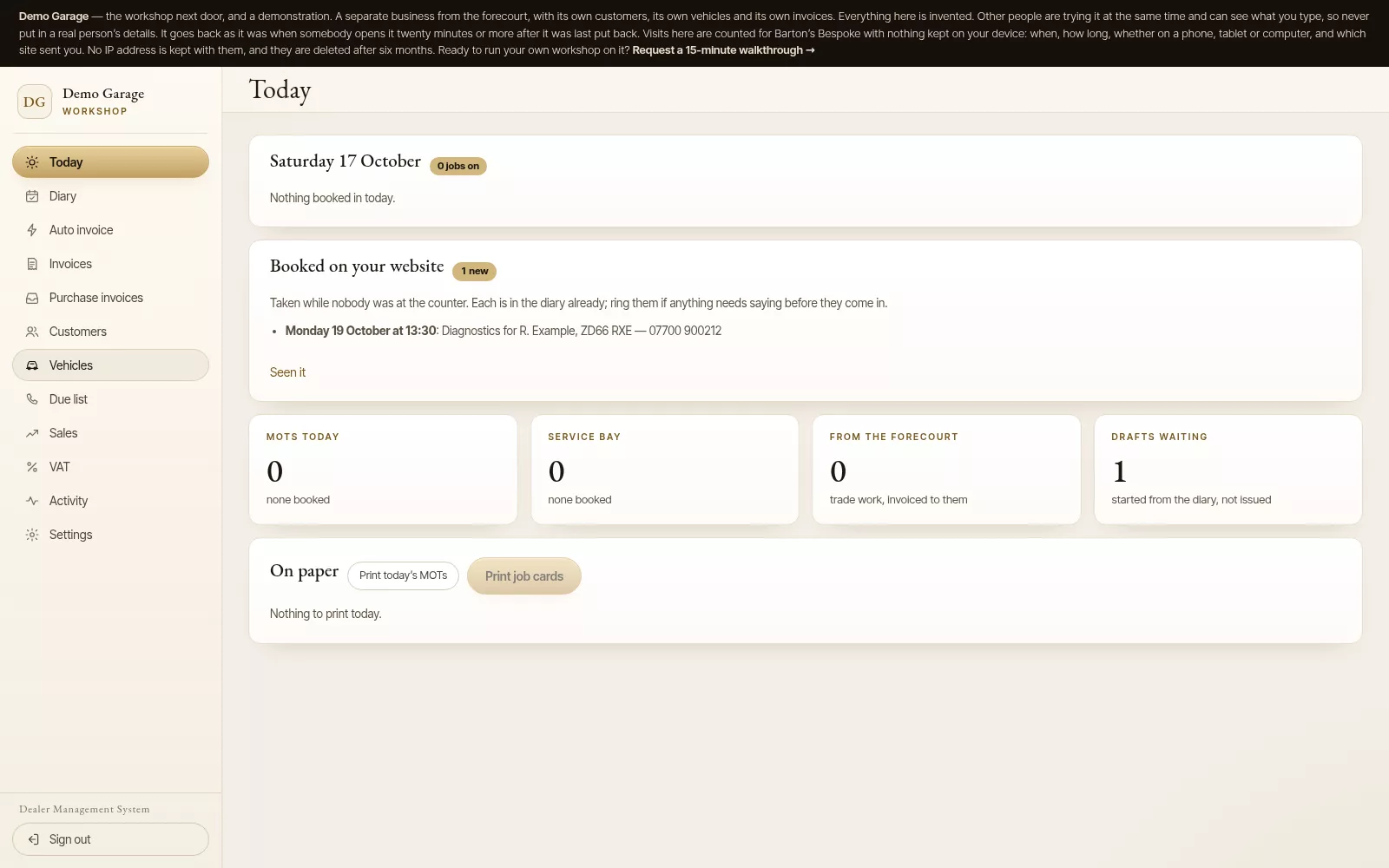
- The booking reaches the diary. Your team can see it alongside bookings made at the counter or over the phone.
That last step is easy to overlook. If an online booking still has to be copied from an inbox into a separate diary, the system has moved the interruption rather than removed it.
Show availability that reflects the workshop
A customer needs to know when they can bring a vehicle in. Your team needs confidence that a time shown online can be honoured.
That means the booking page should use the workshop diary as its source of availability. A free service slot does not necessarily mean an MOT slot is free, so different work may need to follow different queues. The system should account for the way your garage schedules its work.
It should also check availability when the customer submits the booking. If someone else has taken the slot while they were filling in the form, the customer should be asked to choose another time rather than being added on top of an existing job.
For your team, one shared diary keeps online bookings visible beside bookings made in person or by phone. No second calendar to check. No routine re-entry at the end of a busy day.
Capture the details you need
An online booking is only helpful if it gives you enough information to prepare. Start with the basics: the customer’s contact details, the vehicle registration and the type of work requested.
Asking for the registration rather than a make and model reduces the chance of mistakes from typing by hand. On Barton’s Bespoke the booking form asks for the registration, and in the back office it brings the car up from your records, or from a vehicle lookup if it is new to you. The customer’s description still matters. “Service” may be enough for a routine booking; “there’s a knocking noise when I turn left” needs to reach the team in a form they can review.
Keep the form straightforward. Ask for details that help you understand the request, but don’t make a new customer work through a long questionnaire before they can choose a slot. If the job is unclear, leave room for a follow-up rather than trying to make a form settle every question.
Let the routine work come in online
Phone calls are part of running a garage, but not every booking needs a conversation before it can be put in the diary. A customer booking a familiar service or MOT should be able to see what’s available and submit the booking while you’re working.
That helps outside opening hours, too. A customer can take the next step when it suits them, without waiting for the workshop to be quiet enough for you to answer. Your team can review the booking as part of the day’s work.
Online booking is not the same as removing human oversight. It gives customers a clear route for standard requests and gives your staff the details needed to decide what happens next.
Keep a person in the loop where it counts
Some requests shouldn’t be treated as routine. A customer might describe a warning light without knowing its name, ask for several repairs at once or report a fault that changes depending on how the car is driven.
Those jobs may need a call before you allocate the right time or work out what information to gather. The same applies to advisory follow-ups: a technician may need to explain what was found, discuss options and agree what to do next.
A useful booking system should support that judgement rather than hide the need for it. On Barton’s Bespoke an online booking holds its slot at once and shows as new on your Today screen, so you can ring about anything unclear and move it if needed.

Fewer interruptions, clearer records
Every interruption has a cost when you’re diagnosing a fault, handling a vehicle or working under a car. A booking website won’t stop the phone ringing, and some customers will always prefer to speak to someone. But it can give people another route for simple bookings and reduce the need to pause work just to find a time.
It can also make the handover between the customer and the workshop clearer. The booking begins with the customer’s details and request; the diary gives your team a shared place to review it. That is more dependable than relying on a voicemail, a scrap of paper or someone remembering to update a second calendar.
Before choosing a workshop booking system, check the whole journey:
- Can a customer see availability and book online?
- Does the booking go directly into the workshop diary?
- Can you separate different types of work, such as MOTs and servicing?
- Does the form collect customer, vehicle and job details clearly?
- Can your team review or follow up a request that needs more information?
A booking website that works with the diary
Barton's Bespoke provides a workshop website with online booking built into the garage management system. Customers can book against the diary’s availability, with separate queues for MOT and service work. When a slot is taken online, it is checked against the diary so the same time is not booked twice. Online bookings are added to the shared diary; customers pay at the garage, not online.
The website and diary are part of the wider workshop setup, which can also include ramp scheduling, job cards and invoices. See the garage management software page for more detail, or explore the workshop demonstration. The demonstration contains invented customer, vehicle and booking details; it is there to show how the system works, not to represent a live garage.
Your booking page should make the next step easy for a new customer, and make the resulting booking easy for your team to handle. If you’d like to see how that could fit your workshop, you can choose a workshop package or take a look at the demo first.
The pictures in this guide are illustrations, except where a caption says otherwise.