

VAT margin scheme stock books, what used car dealers need to know
What a VAT margin scheme stock book must record for each used car, what goes on the sales invoice, the common mistakes, and where software can help.
In this post
The VAT margin scheme can make a real difference to how you account for eligible used cars. But each car needs its own clear trail: what you paid, who you bought it from, what you sold it for and how much VAT is due on the margin.
A well-kept stock book helps you follow that trail. It also makes routine admin easier when a car sells, your accountant needs the figures, or HMRC asks to see your records.
This guide explains the basics, what to record and where software can reduce duplicate entry. It is general information, not tax advice. Check how the rules apply to your circumstances with HMRC or a qualified accountant.
What is the VAT margin scheme?
The margin scheme is a way for a VAT-registered dealer to account for VAT on the difference between an eligible vehicle’s purchase price and selling price, rather than on its full selling price.
It does not apply to every used vehicle. For example, HMRC says you cannot use the scheme if you bought a vehicle on an invoice showing VAT separately, or if you reclaimed or were entitled to reclaim VAT on it. Check the HMRC guidance on using the VAT margin scheme for second-hand vehicles before treating a vehicle as eligible.
The calculation is based on the vehicle’s margin, not your overall profit after repairs, preparation, transport, finance or overheads. HMRC’s rules on what counts as the purchase and selling price can also depend on the details of a transaction.
Worked example: an illustration
Suppose an eligible car is bought for £1,100 and sold for £1,500:
- Selling price: £1,500
- Purchase price: £1,100
- Gross margin: £1,500 − £1,100 = £400
- VAT due on the margin: £400 × 1/6 = £66.67
The £400 margin includes the VAT due. This is an illustration using straightforward figures, not a calculation for every possible transaction. Under the scheme, VAT is generally calculated at one-sixth of a positive margin. Preparation costs do not reduce that vehicle’s margin for this calculation.
If the vehicle sells at a loss, you do not use that negative margin to reduce the VAT due on a different vehicle.
What needs to go in the stock book?
HMRC requires a stock book that tracks each item sold under the scheme individually, alongside copies of the purchase and sales invoices. The vehicle record needs a unique stock number in numerical sequence.
For each purchase, record:
- Date of purchase
- Purchase invoice number, unless you made out the purchase invoice yourself
- Purchase price
- Seller’s name
- Vehicle description
For the sale, record:
- Date of sale
- Sales invoice number
- Selling price or method of disposal
- Buyer’s name
- Margin on the sale
- VAT due on the margin
For vehicles, HMRC’s margin scheme rules also require the registration number, or VIN if there is no registration, and a description that includes the make, model and colour. Check the current HMRC stock book and invoice requirements for the full detail.
The stock number connects the vehicle’s record to its paperwork. It should appear on the relevant purchase and sales documents so it is straightforward to follow the transaction from buying the car to selling it.
The sales invoice matters too
A margin scheme sales invoice has different requirements from a standard VAT invoice. It must include details such as your business name, address and VAT registration number, the buyer’s details, the invoice date and number, the vehicle description, and its stock book number.
The invoice must also state the total price and include the relevant margin scheme wording. Do not show the VAT separately on the sales invoice.
Keep a copy of the invoice you issue and the purchase invoice you received. HMRC’s record-keeping guidance for margin schemes sets out the required invoice details. It also says VAT records generally need to be kept for six years. If you still hold a vehicle bought more than six years ago for sale under the scheme, keep its records until it is sold.
Record-keeping mistakes to watch for
The same small gaps tend to create extra work later. Check for these common issues:
- The stock number is missing or out of sequence. This makes it harder to connect the car, invoices and stock book.
- A purchase invoice is missing. The vehicle record should be supported by the paperwork for the purchase.
- The purchase or sale price is entered incorrectly. A transposed figure changes the calculated margin and VAT.
- A car is marked sold, but its sale details are incomplete. The stock book needs the sale date, buyer, invoice number and figures.
- VAT is shown separately on a margin scheme invoice. The total price is shown; the VAT on the margin is not itemised for the buyer.
- Different cars are treated as one combined margin. The stock book must track each item individually.
- The margin is confused with net profit. Repair costs and overheads do not simply come off the purchase-to-sale price difference for the margin calculation.
A consistent process helps prevent these gaps: record the purchase when the car arrives, then complete the sale details when the invoice is raised.
Making Tax Digital: an important distinction
Making Tax Digital (MTD) for VAT is already part of routine VAT administration for most VAT-registered businesses. In general, it requires VAT records to be kept digitally and VAT returns to be submitted using compatible software.
There is a specific distinction for margin schemes. HMRC says the additional records for the scheme and the calculation of the margin VAT do not themselves have to be digital. They still need to be maintained and available. Your other VAT records still have digital requirements: your software has to hold the total VAT you owe on sales, for example, and where data moves between pieces of software used for those records, digital links are required. See HMRC’s VAT Notice 700/22 for the detail.
Many general accounting tools are designed for broader bookkeeping and do not provide a vehicle-by-vehicle margin scheme stock book as a native workflow. Barton’s Bespoke’s dealer invoicing and stock book system is designed to keep that vehicle record with the sales invoice. It does not replace your accounting software or accountant; check with your software provider or adviser how your wider VAT records and return should be handled.
How software can keep the steps connected
With a connected dealer management system, the aim is to record information once and use it for the next task:
- Add the vehicle. Enter the vehicle details and purchase information, including the seller and purchase price.
- Build the stock record. The car gets a stock number and its details are held against that vehicle.
- Prepare the sale. When you raise an invoice, the vehicle’s record can supply the relevant sale details.
- Complete the stock book entry. The sale date, invoice number, buyer, selling price, margin and VAT due can be calculated and recorded together.
- Review and export. You remain responsible for checking that the vehicle is eligible, the figures are right and the paperwork is complete. Records can then be exported for your accountant.
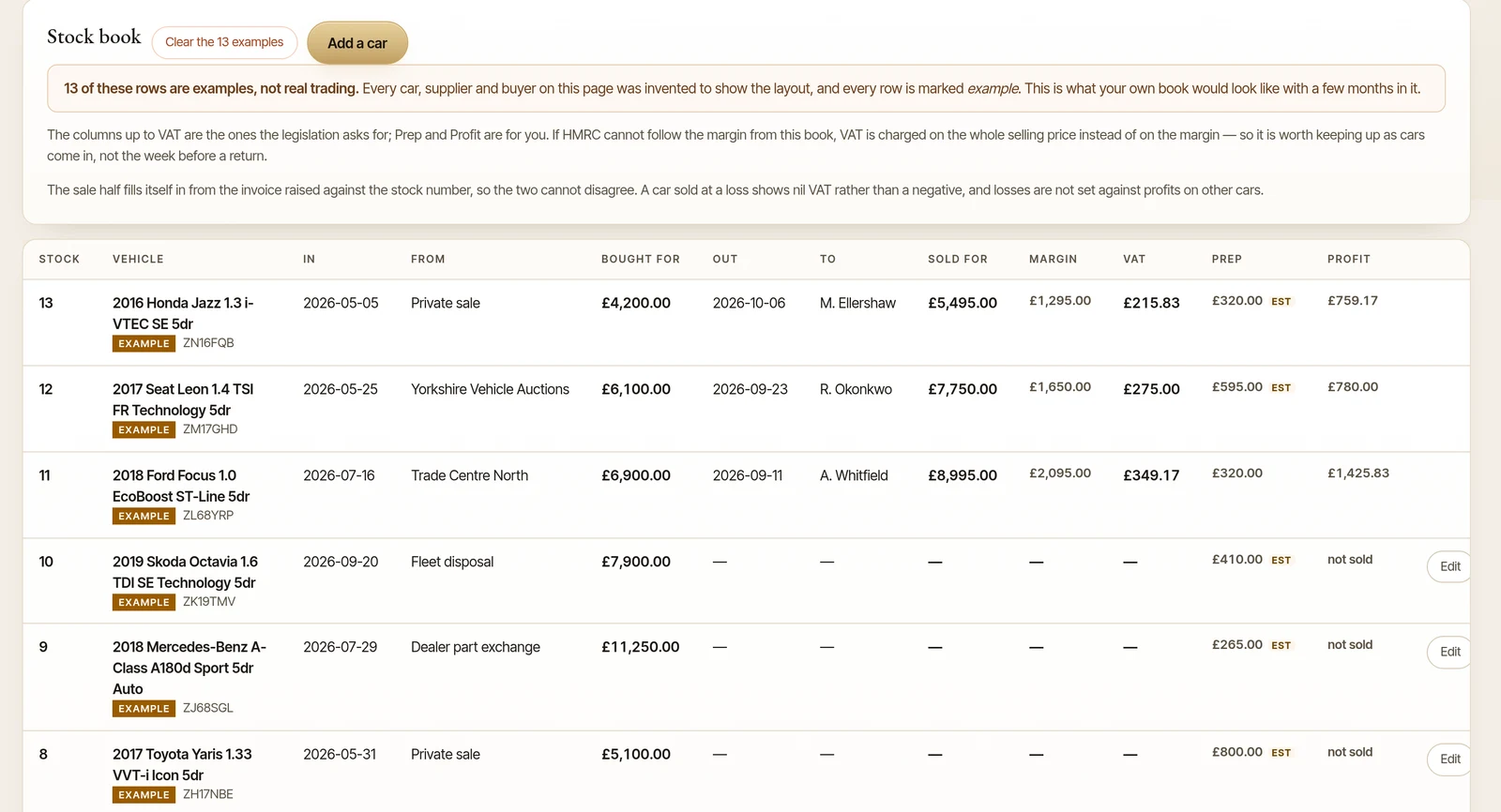
This can remove the need to retype the same car details into a separate spreadsheet, stock book and invoice. It does not remove the need for review or replace professional tax guidance.
Barton’s Bespoke’s dealer management system connects vehicle records and sales paperwork in one back-office system. The stock book and invoices can be exported as CSV files, so you can share the records with your accountant. You can request a walkthrough to see how that process works.
A practical check before your next sale
For each vehicle you plan to sell under the margin scheme, ask:
- Is the vehicle eligible for the scheme?
- Is its stock number present and traceable?
- Do you have the purchase invoice and required purchase details?
- Will the sales invoice include the required information without showing VAT separately?
- Does the stock book show the sale price, margin and VAT due?
- Can you find the purchase and sale records together if you need them?
The pictures in this guide are illustrations, except where a caption says otherwise.