

The sale-day paperwork chain, invoice, handover and stock book without the duplication
How one sale should flow from the vehicle record to the invoice, the handover paperwork and the stock book, with a worked VAT margin scheme example.
In this post
A car is sold. The paperwork should follow once, from the vehicle record to the buyer and your accounts. When the sales invoice draws on the information already held against that car, you can prepare the handover and complete the stock book without rekeying the same details.
For independent dealers, this is a practical test of good car dealer inventory management. The sale is not fully recorded just because the vehicle has left the forecourt. Its invoice, handover paperwork and stock record need to agree.
Why the invoice matters
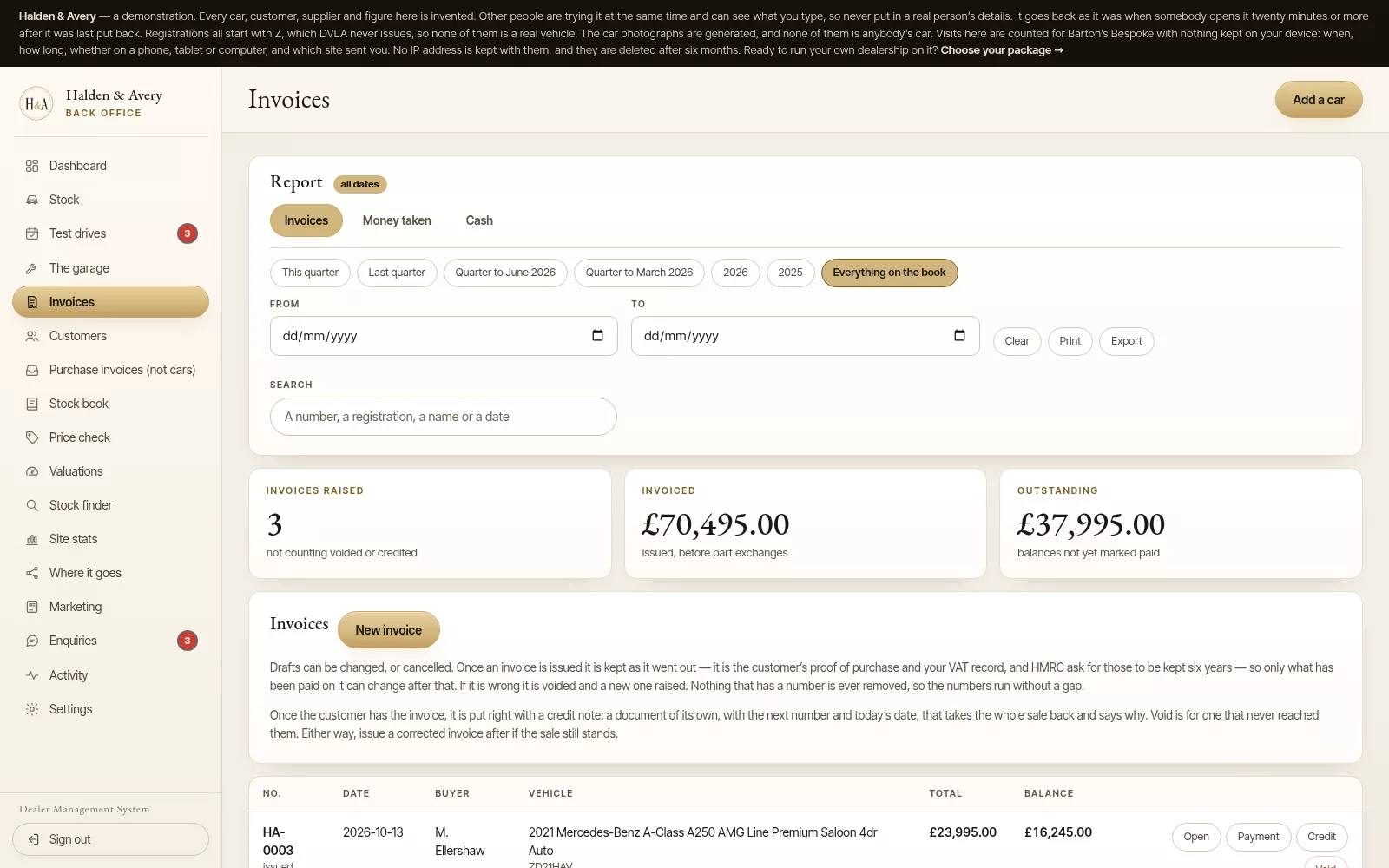
The sales invoice is more than a document for the buyer. It is the point where key details from the vehicle record are used to record the sale.
If those details have to be typed in again, there is another chance for a registration, sale price, buyer detail or stock number to be entered incorrectly. It also means updating several records by hand after a busy handover.
A connected process is simpler: select the vehicle, check the sale details, issue the invoice, prepare the handover paperwork and update the stock book from the same transaction.
What the invoice should pull through
The vehicle record should be the starting point, not a reference you have to keep open while filling out another document. Depending on your process and the sale, the invoice should use information such as:
- Vehicle description and registration
- The vehicle’s stock book number
- The selling price, and the purchase price from the stock book for the margin. The purchase price is not printed on the buyer’s invoice
- Buyer details and the invoice number
- The sale date and payment details
- The applicable VAT treatment
Some of these details are entered or confirmed at the point of sale. The important distinction is that the vehicle identity and its existing purchase information should not have to be recreated.
The invoice still needs a person to check the deal. You decide that the buyer, price, deposit, part-exchange allowance or other relevant figures are correct before issuing it. Automation should prepare the paperwork and carry the confirmed information forward, not make the commercial decision for you.
A clear margin scheme calculation
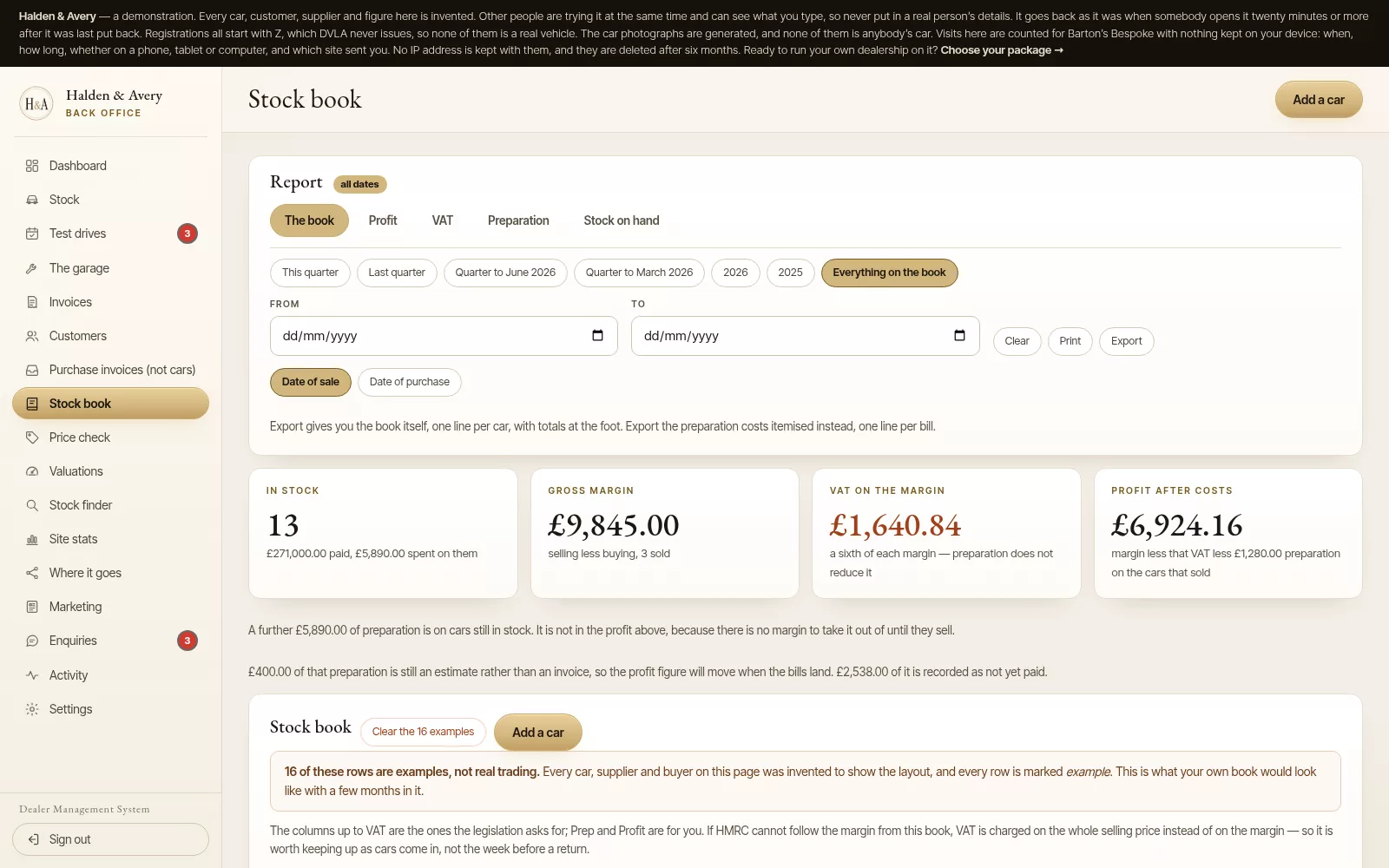
For a qualifying vehicle sold under the VAT margin scheme, VAT is calculated on the difference between the purchase price and the selling price, rather than on the full selling price. That makes both prices important records.
For example, if a vehicle was bought for £8,000 and sold for £10,000, the gross margin is £2,000. At the standard 20% VAT rate, the VAT due on that margin is £333.33: one-sixth of the margin.
That does not mean the full £2,000 is profit. It is the margin used for the scheme calculation, before considering other costs and the business’s wider accounts.
A well-linked system can use the recorded purchase and sale prices to calculate and record the vehicle’s margin and VAT. It should also keep that calculation with the individual vehicle and its sale, so the supporting information is easy to follow later.
The customer’s margin scheme invoice should not show VAT as a separate amount. HMRC’s guidance explains the VAT margin scheme for second-hand vehicles and the records businesses need to keep. For scheme-specific treatment, check the current guidance or speak to your accountant.
From sale to handover, in order
A sale-day process can be made visible in a few steps:
- Open the correct vehicle record. Confirm the stock number, vehicle details and recorded purchase price.
- Enter or confirm the deal. Check the buyer, agreed selling price and any deposit, part exchange or balance due.
- Review the invoice. Check the details and VAT treatment before it is issued to the buyer.
- Prepare the handover paperwork. Create the documents your business uses for the vehicle to leave with the buyer.
- Complete the sale record. Record the sale date, invoice number, buyer and selling price in the vehicle’s stock book entry, alongside the margin and VAT calculation where applicable.
- Keep the trail together. Retain the invoice and related handover and payment records with the vehicle’s sale information.
The sequence matters. A draft is not the same as an invoice that has been issued. Record the issue date consistently with when the invoice is sent or handed to the buyer, and keep a record of the sale and handover.
One sale, one set of figures
On a busy day, it is easy to focus on the buyer’s paperwork and leave the stock record for later. That creates a gap: the car is sold, but the back-office record still shows it as available or has no completed sale details.
The better arrangement is for the invoice to complete the sold part of the vehicle record. The stock book should then show the sale date, invoice number, buyer, selling price, margin and VAT due, using information from the confirmed transaction.
This is the value of entering the sale once. You review the figures at the point of sale, then the related records stay connected. You do not have to copy the invoice details into a separate stock book afterwards.
For a loss-making sale, the margin scheme does not turn a negative margin into a credit to offset against the margin on another vehicle. The vehicle’s own sale record still needs to be completed accurately. If you are unsure how a particular transaction should be treated, confirm it with your accountant.
The downstream payoff
A tidy sale-day record is useful beyond the handover. When each sale has a matching invoice and completed stock book entry, it is easier to review transactions and prepare information for your accountant.
Barton's Bespoke’s dealer invoicing and stock book system links the sales invoice to the vehicle’s stock book record and prepares the handover pack. At the end of a quarter, the accountant pack downloads the VAT figures with every line behind them, the stock book and invoices as spreadsheets, and the sales invoices and bills ready to import into Xero. These records support your accounting workflow; they do not replace your accountant’s review or your responsibility to check that each transaction is recorded correctly.
A simple check at the end of the day
For each car handed over, ask:
- Has the buyer received the correct invoice?
- Does the invoice match the agreed deal and the vehicle record?
- Has the handover paperwork been prepared and retained as needed?
- Does the stock book show the sale and invoice details?
- Are the purchase and selling prices recorded to support the margin calculation?
- Can the sale be found in the records you will use for VAT and your accountant?
A connected system can take away repeated entry, but a short review still matters. The dealer remains in control of what is issued and when.
Barton's Bespoke brings vehicle records, invoicing and the stock book together in one dealer management platform. You can read about the dealer management system or request a 15-minute walkthrough to see how the sale-day steps fit together. No pressure to change your process before you have seen how it works.
Further guidance: HMRC: VAT margin scheme for second-hand vehicles · HMRC: Keeping records for VAT margin schemes
The pictures in this guide are illustrations, except where a caption says otherwise.