

One enquiry, three touchpoints: what happens now and what used to
Follow one buyer's enquiry from a 7pm website message to a phone call and a test drive, the old way and with one connected record of every step.
In this post
A buyer spots a car on your website at 7pm and sends a question. What happens next depends on whether that enquiry is left in an inbox, or carried through a clear record from first contact to final outcome.
This is an illustrative walkthrough, not a real customer enquiry. It follows the same buyer through three touchpoints: a website message, a phone conversation and a test drive.
The old way: one message, several places
It is 7pm. The forecourt is closed, and a buyer has sent a message through the dealership’s website asking whether the car is still available and when they could view it.
1. The email arrives
A notification lands in a shared inbox among other messages. Nobody sees it that evening. That is not unusual when the last job of the day is locking up, not checking email.
The next morning, the message is still there, but so are the day’s calls, handovers and vehicle jobs. The email gets marked for later.
2. A note is made, then separated from the enquiry
Someone spots the message and writes the buyer’s name and car details in a notebook. They mean to call back. But the note does not travel with the original message, and the buyer’s number has not been copied clearly.
A note exists. The full context is elsewhere.
3. The buyer phones
Before anyone returns the call, the buyer rings the dealership to ask about the same car. A member of staff answers, but cannot immediately find the email or the notebook entry. They take another note and promise to check.
Now the enquiry is spread across an inbox, a notebook and a fresh phone note. Nobody has an easy view of what has already been asked or promised.
4. The reply comes too late, or not at all
The team gets busy. A callback is delayed, and the original message is easy to overlook again. By the time someone responds, the buyer may have moved on.
The problem is not that anyone chose to ignore the enquiry. It is that the journey has no dependable trail. The next person to pick it up has to piece together what happened.
The connected way: one enquiry, one place to find it
Now follow the same example using car dealership management software that keeps the enquiry with the car it is about.
1. The website message lands under Enquiries
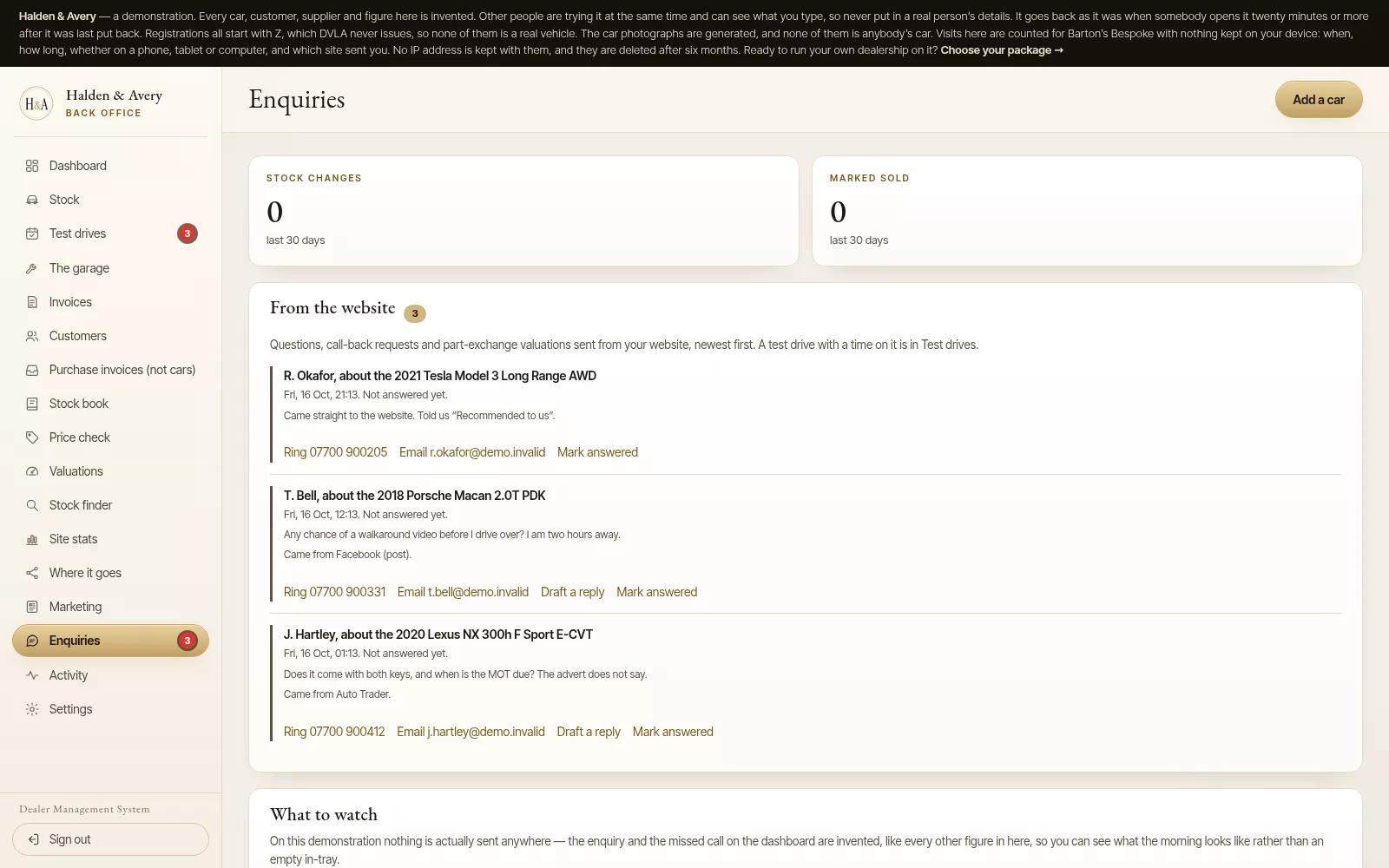
The buyer’s 7pm message lands under Enquiries in the back office, with the car they asked about named beside their question. It shows as not answered yet until somebody deals with it.
The team still decides when and how to respond. If the dealership is closed, nothing promises the buyer an out-of-hours reply.
2. A first reply is drafted for you to finish
A first reply is drafted from the message. It thanks the buyer, repeats their question and leaves a gap for the answer. It never answers the question itself: whether the cambelt has been changed is a fact for you to check in the service book, not one for software to guess.
A member of staff checks the car, fills in the answer and sends the reply from their own email or phone; nothing is sent from the back office. The person remains in control of what is sent. Mark answered then shows the enquiry as answered.
3. The phone call starts from the same question
The buyer rings the next morning. Whoever answers can open Enquiries and see the question they sent and the car it was about, so the buyer does not have to explain it all again.
That matters because an enquiry does not always stay on the channel where it began. A website message may turn into a phone call. Keeping the question with the car means the next colleague does not have to start from nothing.
4. The test drive arrives in the diary
The buyer wants to try the car. They pick a time with Book a test drive on the car’s page, and it arrives in the diary as a request. Staff press Confirm it or Can’t do it, then They came in once the drive has happened, or Remove it if it is no longer wanted.
The website confirms nothing on its own. Only the dealer knows whether the car will be ready, so a time the buyer picks stays a request until somebody at the dealership says yes.
Where does the trail end up?
The customer’s record keeps what they asked and, if they buy, what they bought. If the car sells to somebody else first, the dashboard tells you to let them know and names the nearest car you have in stock.
Not every enquiry ends in a sale, but the question does not disappear into a notebook or someone’s memory. It stays with the customer, and with the car it was about.
That gives the team useful context when the buyer comes back. It also makes handovers between colleagues clearer, especially when the person who first answered the phone is not the person working the next day.
Three touchpoints, one continuous journey
In this example, the enquiry moves through three distinct moments:
- Website message: The buyer asks about a car after hours, and the question lands under Enquiries with the car named.
- Phone conversation: Staff answer from the same question, with the car in view.
- Test drive: The time the buyer picks arrives in the diary for staff to confirm.
A short checklist for making the switch
You do not need to change every routine at once. Start by checking whether each enquiry can make it through these steps:
- Capture it: Do website enquiries land in one consistent place?
- Connect it: Is each enquiry linked to the vehicle it concerns?
- Record it: Can staff see the question, the reply and the booking for the same buyer?
- Review it: Can someone quickly spot enquiries with no response or next step?
If one of those steps depends on remembering which inbox or notebook to check, the process may be worth simplifying.
Keep the conversation moving
A good enquiry process is not about adding more administration. It is about avoiding repeated searches and helping each person who handles the enquiry see what has already happened.
Barton's Bespoke puts every question from your website under Enquiries with the car named, drafts a first reply for you to finish, and puts the test drive times buyers pick into the diary for you to confirm. You can explore the dealer management system or open the demonstration to see how the workflow is laid out. The demo uses invented dealership and vehicle details.
The pictures in this guide are illustrations, except where a caption says otherwise.